
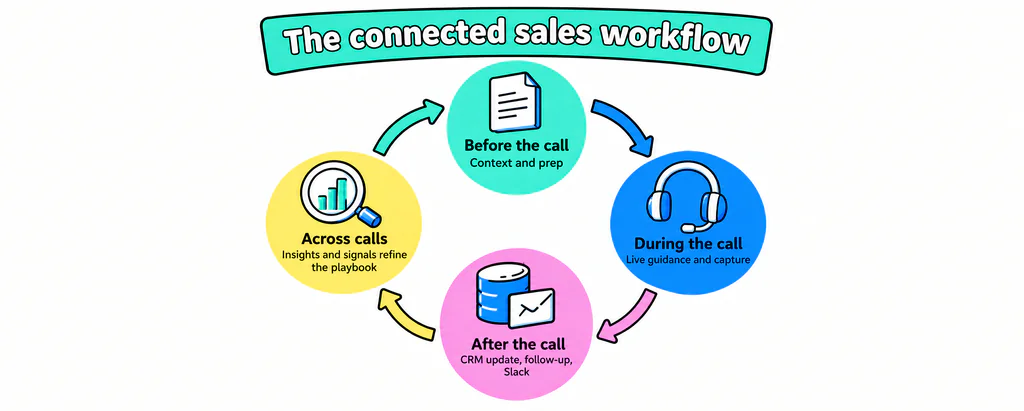
Sales workflows are the repeatable sequences that move a deal from signal to closed-won. For RevOps, the challenge is making those workflows connect across the entire sales cycle: giving reps the right context before a call, supporting execution during the conversation, and making sure the data, follow-up, and insights from that conversation feed what happens next.
When those pieces are disconnected, context gets lost, manual work increases, and RevOps has less visibility into what is working and where the process needs improvement.
- Sales workflows are repeatable sequences of triggers and actions that move leads, opportunities, and customer tasks through the sales process.
- RevOps teams use sales workflows to standardize preparation, lead routing, enrichment, sales execution, CRM updates, follow-up, and reporting.
- Sales workflows break when context, execution, and follow-through are disconnected across the sales cycle.
- Connected sales workflows carry context from pre-call preparation through the conversation and into CRM updates, follow-up, and post-call visibility.
- AI sales assistants can support sales workflows with pre-call context, live guidance, CRM updates, follow-up drafts, and post-call insights and signals.
- RevOps teams can use post-call data, insights, and signals to understand what is working, identify gaps, and refine sales workflows over time.
What Are Sales Workflows?
A sales workflow is a repeatable sequence of triggers and actions that moves a deal forward. Lead comes in, lead gets routed. Call ends, CRM gets updated. Each one is small. Together they run your revenue motion.
Sales workflow vs. sales process vs. sales automation
People use these three terms like they mean the same thing. They don’t. A sales process is the big-picture stage model: prospect, qualify, demo, close. A sales workflow is the repeatable step-by-step sequence inside those stages: the trigger, the action, and the update. Sales automation is the tooling that runs those steps without a human clicking every button.
The anatomy of a sales workflow
Every workflow has three parts. A trigger starts it: a buying signal, a stage change, or a completed call. An action runs next: enrich the record, route the lead, or send the follow-up. Then the system of record gets updated so the next person sees current information. Sales workflows triggered by buying signals are useful because the action starts when the deal context changes.

Why sales workflows matter to RevOps
For RevOps, workflows aren’t a convenience. They connect the context, actions, data, and follow-through that keep the revenue process running consistently. When every rep follows the same steps, deal stages mean the same thing across the team, handoffs carry the right context, and pipeline hygiene stops being a quarterly cleanup project. Better RevOps workflows also reduce manual admin and give teams better visibility into how the process is working.
The Sales Workflows RevOps Teams Can Automate With AI
AI can support several workflows across the sales cycle, reducing manual work while giving RevOps better visibility into execution.
Conversation insights that improve sales execution
Conversation insights can turn patterns across calls into inputs for the wider revenue process. RevOps teams can use them to identify recurring objections and competitive mentions, refine messaging and battle cards, and surface individual coaching needs. That connects what happens in customer conversations back to the playbooks, content, and guidance teams use next.
Signals that trigger workflows and alerts
Signals from customer conversations can trigger the next workflow or alert the right person. An upsell opportunity or churn risk can be surfaced to customer success, while a team lead can be notified when a rep makes an unsupported product claim or crosses an approval boundary. Other triggers can feed downstream workflows for relevant collateral, follow-up, or sequences.
Meeting and call capture
Notes, attendees, next steps, and answers to discovery questions all surface on the call. Many teams still capture that information by hand, later. Learning how to automate sales call workflows matters because this is the data everything downstream depends on.
CRM updates and field hygiene
Once the call data exists, CRM updates can automate fields such as deal stage, MEDDIC or BANT fields, and contact roles. The CRM workflows that save time for sales reps are the ones that reduce manual data entry after the meeting. That turns CRM hygiene into an output of the workflow.
Follow-up and post-call cadence
The deal stalls in the gap between “great call” and “sent the recap.” Knowing how to automate sales follow up workflows closes it: a summary is generated, a follow-up email is drafted, and the next task is ready to action. That keeps momentum while the conversation is still fresh.
Pipeline review and reporting
The last workflow is a payoff of the others. When stages, fields, and notes are clean, pipeline review relies on current records instead of rep-by-rep reconstruction. Reports reflect reality, stage movement is trustworthy, and forecasting rests on data instead of optimism.
Where Manual Sales Workflows Break Down
The execution and insight gap
The first breakdown happens during the conversation. Reps defer questions they cannot answer, mishandle objections, skip discovery, jump to the demo, or end the call without clear next steps. The second happens afterward, when useful context is lost between the conversation and the CRM. At the same time, RevOps can miss a much larger opportunity: using conversational data across calls to uncover recurring objections, competitive trends, execution gaps, and other patterns that can improve the wider sales process.
Incomplete and late CRM data
Late data isn’t a cosmetic problem. Empty fields break routing rules. Stale stages blind the forecast. RevOps ends up firefighting before every board meeting, chasing reps for updates that should have written themselves. Anyone who has cleaned a pipeline the night before a QBR knows the feeling.
Why bolt-on automation isn’t enough
Teams often bolt on tools. A sequencer automates outreach. A dialer logs calls. A note-taker records the meeting. Each one automates a slice, and the structured call data still doesn’t reach the CRM in a usable shape. AI-powered sales workflows need to capture at the source instead of stitching exports together after the fact.
How to Automate Sales Workflows Across the Sales Cycle
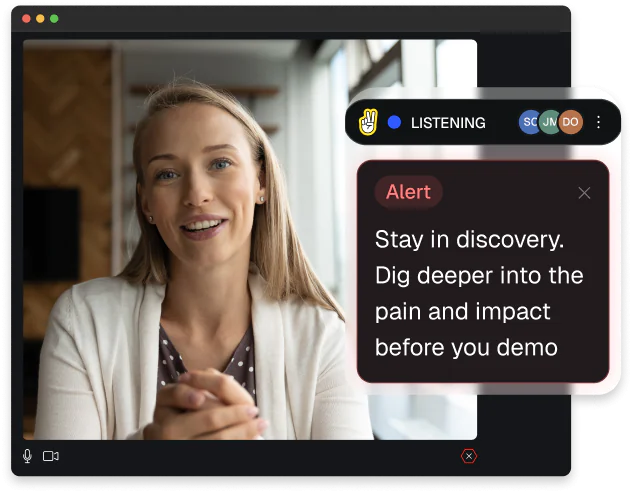
AI can automate parts of the sales workflow before and after the call, but execution during the conversation is different: once a question is deferred, an objection is mishandled, or a critical discovery step is skipped, fixing the record afterward cannot fix the conversation. Real-time guidance closes that gap while there is still an opportunity to act, while automation handles the data and follow-through around the call.
Step 1: Support execution in real time
Start where execution happens: during the conversation. WINN.AI’s Live Assist can reinforce the playbook, surface relevant guidance and company knowledge, and help reps address questions, objections, and required methodology steps while there is still time to act. It can also capture notes, CRM fields, and methodology answers as they’re spoken, so reps can stay focused on the buyer instead of switching between the conversation and the CRM.
Step 2: Auto-update the CRM with less rep data entry
Then the record gets updated with information captured during the conversation. This is how to automate sales workflows using a CRM without leaning on reps to type everything afterward: relevant deal information can write back to Salesforce or HubSpot as structured fields, notes, and next steps.
Step 3: Trigger follow-ups, summaries, and Slack updates automatically
With clean data in place, downstream workflows can run without extra data entry. A call summary is generated, an AI-powered follow-up email is drafted, and the deal update reaches the team through a Slack integration. The rep closes the loop without opening five tabs.

Step 4: Reinforce the playbook so the workflow stays consistent
A workflow only works if reps follow the same required steps. Live playbook prompts keep discovery questions, qualification fields, and next steps consistent across the team. Consistent playbook use gives RevOps cleaner data to work with.
What this means for RevOps
Pull it together and RevOps gets a closed loop: context and preparation before the call, better execution during it, and data, AI insights, and signals that shape what happens next. Signals can surface the events RevOps cares about, from churn and deal risk to competitor mentions, so the right people can act while the information is still useful. AI insights across conversations show what is working, where gaps keep appearing, and where the sales process needs fine-tuning. When you’re ready to compare options, see our guide to B2B sales workflow tools.
Ready to close the call-to-CRM gap?
Your reps already handle discovery, objections, questions, and next steps during the call. The challenge is carrying that context into the CRM and the workflows that follow. WINN.AI helps close that call-to-CRM gap by guiding reps during live conversations, capturing structured deal data, updating CRM fields, and turning follow-up into a workflow instead of a memory test.
Bring one real workflow to the demo: the required fields, the handoff, and the follow-up standard your team needs to protect. Book a demo or learn more about WINN.AI for RevOps.
Related
Best Sales Training Software that Builds Top Performers
Your reps finish onboarding, ace the quiz, then revert to old habits on the first live call. That gap is the whole problem. The best sales training software closes that gap by reinforcing the right behaviors during live customer conversations, not just in training modules. This guide compares the main categories of sales training platform, […]

How to Reduce Sales Rep Ramp Time with the Right Tools
Key takeaways Why New Rep Ramp Time Is Taking Too Long Reps usually ramp slowly because onboarding has to hold up during live buyer conversations. A plan can look clear in training and still break down when a new rep handles discovery, objections, and next steps in a live conversation. Once reps start selling, improvement […]

Deal Execution Playbook: How to Close More B2B Deals
What Is Deal Execution and Why It Determines Revenue Outcomes Deal execution is the work of moving a qualified opportunity to closed-won. It includes engaging the right stakeholders, handling objections, confirming decision criteria, and driving the next steps that move the opportunity forward. Qualification helps determine which deals are worth pursuing, while forecasting estimates which […]